Showing posts with label Orchestration. Show all posts

Friday, January 21, 2011

Untyped Messages and WCF Services in a real scenario

Context:


This project was my first big Biztalk experience. It started more than two years ago (is still in Biztalk 2006 R2) and most of the work was made based on pre-conceived ideas of what was good, what was easy, what was trustable.
The project kept on growing and at a certain point the desire to trash it all and restart was too strong. This is an example of how to slowly modify a monster-like orchestration. The images and names aren’t always the same because they are not from a case-study, they were all taken from a real project. It consisted of several orchestrations and this post was made when each one of them was in a different stage of transformation so that all situations are represented.


In this project we had to deal with a bunch of different XML files, different types, different schedules, and, worst of all, different actions on the destination server.

Transport properties


We could make this by using maps on the send port, but the tracking of the messages was critical so we needed to keep track of the message on every step of the journey. So, an orchestration was the choice.

To reunite everything, the receive port that collects them (from FTP, SAP idocs, etc.) is the entry of the orchestration. The Message schema in the orchestration is System.Xml.XmlDocument so all schemas are accepted with no distinction.
A Decide component help us creating the basic structure for it, with a lot of conditions of type
OriginalMessage(BTS.MessageType) == http://Company/Schemas/BusinessPartnerActivityTypes#ActivityTypes

and a two-way destination port prepared for send/receive schemas of type System.Xml.XmlDocument, we could make it by repeating a lot of components.

For each flow we make

1. Transform Xml (Received message) to original schema
FCBusinessPartnerActivityTypes = OriginalMessage;


2. Map original schema to service schema
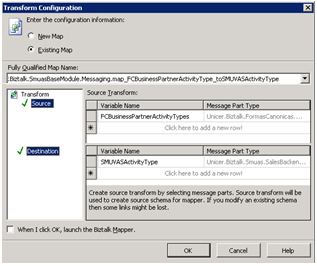
Transform Map


3. Transform ServiceSchema to Xml (port schema)
XmlMessage = SMUVASActivityType;


4. Send to Service

5. Receive Response

6. And after some flows made the general picture would be something like

messy orchestration


How to make it in a lighter way?


The first step is to remove the transformation.

1. Declare a string variable for the map, called mapName

1.1. Use an expression editor to select the map based on the message type

1.2. Use the Fully Qualified Name of the map

mapName="";
if(OriginalMessage(BTS.MessageType) == "http://Company/Schemas/OrderTypes#OrderTypes"){ mapName="Company.Biztalk.SmuasCommercialModule.Messaging.map_FCOrderTypes_to_SMUVASOrderTypes";
}
if(OriginalMessage(BTS.MessageType) == "http://Company/Schemas/OrderStatus#OrderStatus"){
mapName="Company.Biztalk.SmuasCommercialModule.Messaging.map_FCOrderStatus_to_SMUVASOrderStatus";
}
…


2. Then in a message assignment use the transform method.

mapSystemType = System.Type.GetType(mapName);
transform(XmlMessage) = mapSystemType(OriginalMessage);


3. The orchestration will be much simpler.

medium mess orchestration


The next optimization is to remove the multiple actions.


At the if that defines the map, you can also define the action. Something like

if(OriginalMessage(BTS.MessageType) == "http://Company/Schemas/Banks#Banks"){
mapName="Company.Biztalk.SmuasFinancialModule.Messaging.map_FCBanks_to_SMUVASBanks"; action="http://SmuAs/Services/BackendServices/CommonBackendSyncService/ICommonBackendSyncService/SetBankList";
}


And when the request message is created, give it the correspondent action.

mapSystemType = System.Type.GetType(mapName);
transform(RequestMessage) = mapSystemType(OriginalMessage);
RequestMessage(WCF.Action)= action;


The look of the orchestration is much lighter and pleasant to work with.
Simple orchestration

Using Business Rules Engine (I)

Making business rules without messages


The most common way of using business rules is by evaluating a XML message with XPath and return an XML message with more info. The problem is that most of the examples are orchestration dependents: by demanding a compiled DLL with the schemas to be used, they limit the possibilities.
In a project with many orchestrations an easy solution is to make a solution with the schemas, compile, define the rules based on that DLL, and then apply them in the remaining solutions. If it is a small project where schema and orchestration could be on the same DLL, a first compilation is needed for BRE to access the schema. Only then the orchestration can add the rule.

But, what if the message is not important in any direction? What if you just want to use the same rule in all orchestrations without referring each and every DLL?
Scenario: ten distinct schemas. One flow in and one flow out for each. The same tracking rules apply on each direction, depending only on the schema. Here I found a great way of corrupting the principles of the rules.
I recommend this blog because it was the first were I could find any comprehensible info about BRE.

Basic: Policies have versions, on each version one or more rules. By activating different versions different rules can be in use. A rule is divided in condition and actions. A straight-forward "If-Then".

BRE Policy, Versions, Rules


Usually each orchestration has its own rule and each rule is for an orchestration, a direct match.
The trick is to make a single rule, the if always true, and the orchestration will receive information that can be used or not.

The advantage of business rules engine is the low processing time and the changeable ease (copy version, edit, publish and deploy). There are no big processing advantages in using rules this way, but the changing method is still easy and no deployments required.

Making the if always true


Like always, just use the condition 1==1 or something that obvious.
On the actions list, we’ll use an ArrayList to return a list of words.
  • Go to facts explorer window
  • Select .NET classes
  • Right-click and browse .NET Assemblies
  • Select the mscorlib library
  • Press OK

    BRE Search Library


    The library will become available.

    BRE ArrayList Add


    Find ArrayList and the Add() method, and drag it to actions pane as many time as you’ll need.
    Fill in with the key strings and publish the version.

    BRE Actions


    Add to the orchestration variables list one of type ArrayList.
    Go to Orchestration View and right click Variables folder for New Variable
    At new variable define name (in this example rulesArray) and type (<.NET Class…>, mscorlib, ArrayList)
    Create another variable, of type Boolean called generateAck.
    Add Call Rules component and use that variable as destination for the output.

    BRE Cal Rules


    And then at a Expression editor, search for the value and do as you please. In this example, only for the flows listed we’ll generate Ack. The fixed value is the message type that the orchestration mandatorily knows.

    Expression Editor


    For instance we are searching for Purchase Orders, abbreviated PO. Since the rulesArray includes that value, ANY orchestration that has Purchase Orders will set generateAcks as true and therefore record Acks, if the proper code is made.
  • Friday, December 5, 2008

    Defining new filenames for send handler

    How to create more ellaborated filename?


    Following the list of predefined file names given on my previous post, how can you get more than what Biztalk gives you?

    Solution:


    You can change the SourceFileName. In the construct message block of the orchestration use something like the following:

    Message_2 = Message_1;
    Message_2(FILE.ReceivedFileName) = "your_value"+ToString(Message_1.id);

    And then when you are defining the send port use File Name as usually: %SourceFileName%

    Sunday, November 16, 2008

    Ports and correlations

    You must specify at least one already-initialized correlation set for a non-activation receive that is on a non-selfcorrelating port.


    There is not a better error to start whin than this wonderful classic. This error happens to everyone all the time. When you start making an orchestration you may be thinking of this, but it will vanish from your mind before the first component is set.

    Solution:

    The beggining of the orchestration - usually a Receive component - must have the property Activate as True. Why isn't this a default in Biztalk? Good question...